
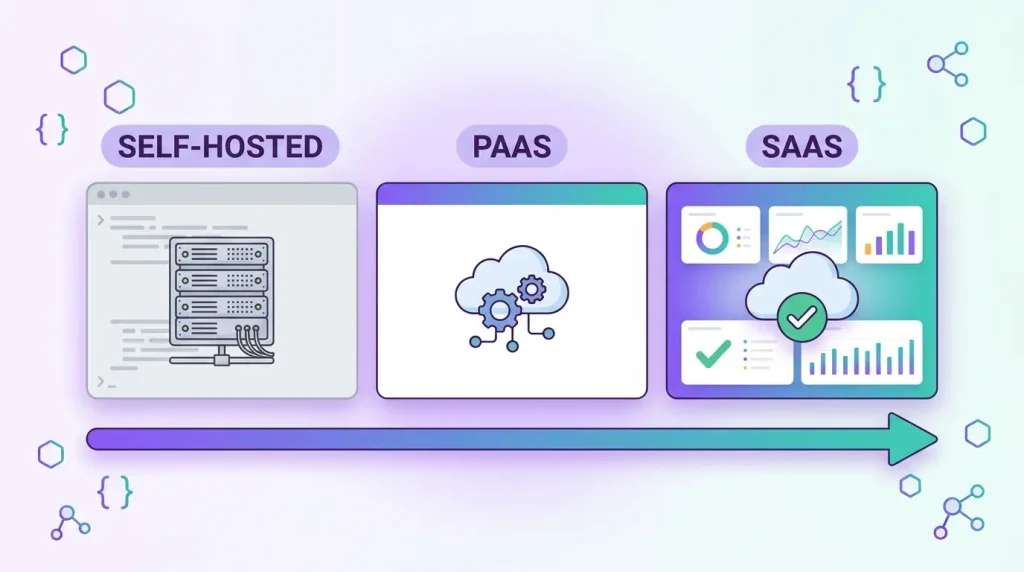
Liferay offers three ways to run Liferay DXP: Self-Hosted, PaaS and SaaS. The choice looks like an infrastructure question, but it is really a decision about who owns upgrades, how you are allowed to customize the platform, and how much operations work your team wants to carry. This guide compares Liferay SaaS vs PaaS vs self-hosted so you can pick the model that fits your company, not the one that sounds most modern.
The three Liferay deployment models in plain terms
According to Liferay’s own documentation, the difference is how much of the stack you run yourself and how much Liferay runs for you.
- Self-Hosted: Liferay provides the DXP software. You provide and run everything else: servers, installation, upgrades, the search engine, clustering and high availability, either on-premises or in your own cloud account.
- PaaS: Liferay runs the cloud infrastructure and platform services (web server, database, backups, search, a CI/CD pipeline) through the Liferay Cloud Console. You keep control over the services and their configuration, and you remain responsible for upgrading DXP.
- SaaS: Liferay manages virtually the whole environment, including infrastructure, software updates, patches and security hotfixes. You get less control in exchange for less operational work.
Liferay SaaS: least operations, tightest customization rules
With SaaS, Liferay provides the platform, the cloud architecture, product support, an uptime SLA, regular updates and patches. Your team no longer plans upgrade projects for the platform itself, which removes one of the largest recurring costs of running Liferay (see our guide to what a Liferay upgrade costs).
The trade-off is customization. Liferay SaaS does not support deploying custom OSGi plugins. Customization happens through client extensions and built-in configuration such as Liferay Objects. Client extensions run outside the core and rely on APIs that change rarely between versions, which is exactly why they can survive upgrades that Liferay applies for you.
SaaS is a good fit when
- Your needs are covered by out-of-the-box features, Objects, fragments, and client extensions.
- You do not have an in-house platform or DevOps team and do not want one.
- You prefer predictable, subscription-style operations over project-based upgrades.
SaaS is a poor fit when
- You depend on custom OSGi modules, service builder code or core overrides that cannot be rewritten as client extensions.
- You need to control infrastructure details such as network topology, a specific database engine or data residency beyond what the offering provides.
Liferay PaaS: managed infrastructure, your own platform
PaaS (Liferay Cloud) sits in the middle. Liferay operates the infrastructure and provides autoscaling, failover, load balancing, backups and a CI/CD workflow tied to your code repository. You still configure and maintain the services, and Liferay does not apply DXP upgrades and patches for you. It is single-tenant, so your environment is not shared with other customers.
Because OSGi modules are supported on PaaS, it is the natural home for companies with an existing customized Liferay estate that want to stop managing servers. Client extensions work here too, and Liferay recommends them as the primary customization method on its cloud offerings.
Self-hosted Liferay: maximum control, maximum responsibility
Self-hosting gives you the highest level of control over hardware, networking, database, search and customization. It also means your team handles installation, patching, monitoring, clustering, backups and every upgrade. For regulated industries, air-gapped networks or strict data-sovereignty rules, it is sometimes the only option. For everyone else, it is a deliberate choice to own operations.
Self-hosted projects are built with Liferay Workspace, and all customization options are open: OSGi modules, client extensions, themes and hooks. That freedom is also where upgrade cost comes from, since every custom module has to be verified against each new release. If you are weighing this, read our comparison of client extensions vs OSGi modules.
The hidden costs that decide the comparison
License and hosting prices are the visible part. The costs that usually decide the outcome are less obvious. On self-hosted and PaaS, every major release means regression testing, dependency checks for each custom module, and a planned upgrade window. Those projects need budget and people, and they tend to be postponed until support deadlines force them. On SaaS, that work shrinks, but you take on a different constraint: your roadmap has to fit what client extensions and native features can do.
Also consider staffing. Self-hosting a clustered Liferay environment requires people who understand the application server, search, database tuning and monitoring. If those skills sit with one or two individuals, that is a business risk in itself, and a managed model can be cheaper than the cost of replacing them.
Side-by-side comparison
- Who runs infrastructure: you (self-hosted), Liferay (PaaS and SaaS).
- Who upgrades DXP: you (self-hosted and PaaS), Liferay (SaaS).
- Custom OSGi modules: allowed (self-hosted and PaaS), not supported (SaaS).
- Client extensions: supported on all three.
- Tenancy: PaaS is single-tenant, SaaS is multi-tenant.
- Control level: highest on self-hosted, lowest on SaaS.
How to choose: five questions
- How much custom OSGi code do we have? A lot of it usually rules out SaaS until it is rewritten.
- Who will own upgrades in three years? If the honest answer is nobody, favor SaaS.
- Do compliance rules dictate where and how we host? That can force self-hosted or a specific cloud region.
- Do we have DevOps capacity? Self-hosting without it creates risk, not savings.
- What does the total cost look like over five years? Include staff time, upgrade projects and downtime, not just licenses and servers.
Pricing and feature matrices change, so confirm the current terms of each offering with Liferay before committing. For deeper context on the Liferay platform, see our Liferay services page.
Moving between models
A common path is from self-hosted to PaaS first, then to SaaS once custom code has been refactored into client extensions. This staged approach spreads risk: you remove infrastructure work first and customization debt second. A migration usually starts with an inventory of custom modules, hooks and integrations, and a decision for each one: keep, rewrite as a client extension, replace with a native feature, or retire. Our Liferay migration case study shows what that inventory work looks like in practice.
Frequently asked questions
Is Liferay SaaS cheaper than self-hosting?
Not automatically. SaaS removes infrastructure and platform-upgrade work, which often lowers total cost of ownership for teams without platform staff. If you already run Liferay efficiently with your own team, the license-plus-operations comparison can be closer. Compare multi-year totals, not only subscription prices.
Can I run custom OSGi modules on Liferay SaaS?
No. Liferay documents that custom OSGi plugins are not supported on SaaS. Use client extensions, Objects and fragments instead, or choose PaaS or self-hosted if you must keep OSGi code.
Who upgrades Liferay DXP on PaaS?
You do. On PaaS, Liferay manages the infrastructure, but DXP upgrades and patches remain your responsibility, which is the main practical difference from SaaS.
Can I switch from self-hosted to SaaS later?
Yes, but plan for it. The main work is converting custom OSGi code and integrations into client extensions or native features, and migrating content and configuration into the new environment.
Planning a Liferay upgrade? Get a free technical assessment. We will review your customizations and recommend the deployment model that fits your team.